
ATOM STRUCTURE
CALCULATOR
Proton · Neutron · Electron · Isotope · Ion Analysis
Click any element to auto-fill the calculator.
| Particle | Symbol | Charge | Mass (u) | Location |
|---|---|---|---|---|
| Proton | p⁺ | +1 | 1.007276 | Nucleus |
| Neutron | n⁰ | 0 | 1.008665 | Nucleus |
| Electron | e⁻ | −1 | 0.000549 | Orbitals |
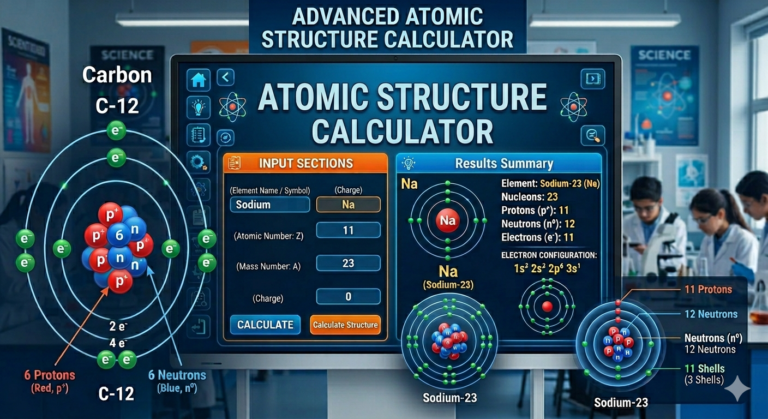
ATOM STRUCTURE CALCULATOR – Complete Guide, Uses, and Benefits
Article Outline
- H1: Atom Structure Calculator – Complete Guide
- H2: What is an Atom Structure Calculator?
- H3: Basic Definition and Purpose
- H3: Why Students and Professionals Use It
- H2: Understanding Atomic Structure
- H3: Protons, Neutrons, and Electrons
- H3: Atomic Number and Mass Number
- H2: How an Atom Structure Calculator Works
- H3: Input Requirements
- H3: Output Data Explained
- H2: Key Features of Atom Structure Calculators
- H3: Instant Calculations
- H3: Error Reduction
- H2: Step-by-Step Guide to Using an Atom Structure Calculator
- H3: Entering Atomic Number
- H4: Adding Mass Number
- H2: Benefits of Using an Atom Structure Calculator
- H3: Saves Time
- H3: Improves Accuracy
- H2: Applications in Education and Research
- H3: Use in Schools
- H3: Use in Laboratories
- H2: Common Mistakes to Avoid
- H3: Incorrect Inputs
- H3: Misunderstanding Results
- H2: Best Online Atom Structure Calculators
- H3: Free Tools vs Paid Tools
- H2: Conclusion
- H2: FAQs
- H2: What is an Atom Structure Calculator?
What is an Atom Structure Calculator?
Basic Definition and Purpose
An Atom Structure Calculator is a smart digital tool designed to simplify one of the most fundamental concepts in chemistry—atomic structure. Instead of manually calculating the number of protons, neutrons, and electrons, this calculator does the heavy lifting for you in seconds. You simply input values like the atomic number or mass number, and the tool instantly reveals detailed atomic information.
Think of it like a GPS for chemistry. Instead of getting lost in complex formulas and periodic table confusion, the calculator guides you directly to accurate answers. Whether you’re a beginner trying to grasp atomic basics or an advanced learner solving complex problems, this tool bridges the gap between theory and application.
What makes it even more valuable is its ability to remove human error. When you’re doing calculations manually, even a small mistake can lead to incorrect results. An atom structure calculator eliminates that risk, making it an essential companion for students, teachers, and researchers alike.
Why Students and Professionals Use It
Let’s be honest—chemistry can get overwhelming. Between memorizing elements and understanding atomic behavior, it’s easy to feel stuck. That’s exactly where an atom structure calculator becomes a lifesaver. Students use it to verify homework answers, prepare for exams, and understand concepts more clearly.
Professionals, on the other hand, rely on these tools for quick calculations during experiments or research work. Time is critical in scientific environments, and no one wants to spend unnecessary minutes solving basic equations. The calculator speeds up workflows and improves productivity.
It also supports learning by providing immediate feedback. When you see the results instantly, your brain connects the input and output faster. It’s like having a tutor available 24/7, guiding you through atomic concepts without judgment.
Understanding Atomic Structure
Protons, Neutrons, and Electrons
At the heart of every atom lies a fascinating structure made up of three primary particles: protons, neutrons, and electrons. Protons carry a positive charge and are located in the nucleus. Neutrons, which have no charge, also reside in the nucleus and help stabilize the atom.
Electrons, on the other hand, are negatively charged and orbit around the nucleus in energy levels or shells. These tiny particles play a huge role in chemical reactions and bonding. The number of protons determines the identity of the element, while electrons dictate how it behaves chemically.
Imagine an atom as a mini solar system. The nucleus is the sun, and electrons are planets orbiting around it. This simple analogy helps visualize how atoms are structured and why understanding them is crucial in chemistry.
Atomic Number and Mass Number
Two important values define an atom: the atomic number and the mass number. The atomic number represents the number of protons in an atom, and it uniquely identifies each element. For example, hydrogen has an atomic number of 1, while oxygen has 8.
The mass number is the sum of protons and neutrons. It gives you an idea of the atom’s total mass. Using these two values, you can easily determine the number of neutrons by subtracting the atomic number from the mass number.
An atom structure calculator uses these exact principles to generate results. Instead of manually calculating, you input these values, and the tool instantly provides accurate data.
How an Atom Structure Calculator Works
Input Requirements
Using an atom structure calculator is surprisingly simple. Most tools require just two key inputs: the atomic number and the mass number. Some advanced calculators may also allow you to enter the element name directly.
Once these values are entered, the calculator processes the data using basic chemistry formulas. It identifies the number of protons, calculates neutrons, and determines electrons based on whether the atom is neutral or ionized.
This simplicity is what makes the tool so powerful. You don’t need to memorize formulas or worry about calculations—the system handles everything behind the scenes.
Output Data Explained
After processing the input, the calculator provides a detailed breakdown of the atom’s structure. This typically includes:
- Number of protons
- Number of neutrons
- Number of electrons
- Electron configuration (in advanced tools)
The results are displayed instantly, often in a clean and easy-to-understand format. Some calculators even provide visual diagrams, making learning more interactive and engaging.
Key Features of Atom Structure Calculators
Instant Calculations
One of the standout features of an atom structure calculator is speed. What might take several minutes manually can be done in seconds. This is especially useful during exams or time-sensitive tasks.
Error Reduction
Mistakes in chemistry calculations can be frustrating. A small error can lead to completely wrong answers. These calculators minimize that risk by automating the process, ensuring accurate results every time.
Step-by-Step Guide to Using an Atom Structure Calculator
Entering Atomic Number
Start by entering the atomic number of the element. This is the most critical input because it determines the number of protons.
Adding Mass Number
Completing the Input
Next, input the mass number. Once both values are entered, simply click the calculate button, and the results will appear instantly. It’s that easy.
Benefits of Using an Atom Structure Calculator
Saves Time
Time is valuable, especially when you’re juggling multiple subjects or working on complex research. This tool helps you save time by automating calculations.
Improves Accuracy
Accuracy is crucial in chemistry. By using a calculator, you reduce the chances of errors and ensure reliable results every time.
Applications in Education and Research
Use in Schools
Teachers often recommend atom structure calculators to help students understand concepts more clearly. It acts as a learning aid rather than a shortcut.
Use in Laboratories
In research labs, speed and precision are essential. Scientists use these tools to quickly verify atomic data during experiments.
Common Mistakes to Avoid
Incorrect Inputs
Entering the wrong atomic or mass number will lead to incorrect results. Always double-check your inputs.
Misunderstanding Results
Some users blindly trust the output without understanding it. It’s important to learn the logic behind the results for better comprehension.
Best Online Atom Structure Calculators
Free Tools vs Paid Tools
| Feature | Free Tools | Paid Tools |
|---|---|---|
| Cost | Free | Subscription-based |
| Accuracy | High | Very High |
| Features | Basic | Advanced |
| User Interface | Simple | Professional |
Free tools are great for beginners, while paid versions offer advanced features like electron configuration and visual models.
Conclusion
An Atom Structure Calculator is more than just a digital tool—it’s a powerful learning companion that simplifies complex chemistry concepts. Whether you’re a student trying to understand atomic basics or a professional needing quick calculations, this tool saves time, improves accuracy, and enhances understanding. It removes the fear of errors and replaces it with confidence, making chemistry more approachable and enjoyable. With technology evolving rapidly, tools like these are shaping the future of education by making learning smarter, faster, and more interactive.
FAQs
1. What does an atom structure calculator do?
It calculates the number of protons, neutrons, and electrons based on atomic and mass numbers.
2. Is it accurate for all elements?
Yes, as long as you input the correct values, the results are highly accurate.
3. Can beginners use it easily?
Absolutely. Most calculators are user-friendly and designed for all levels.
4. Does it show electron configuration?
Some advanced calculators provide detailed electron configurations.
5. Is it free to use?
Many atom structure calculators are available online for free, though premium versions offer extra features.